SabiBom logoSabiBom

How SabiBom works

From the first setup to the next smart move.

SabiBom is designed as a connected daily workflow. It helps you understand what is happening, take care of the details, and keep the business moving.

SabiBom smart dashboard with sales totals, alerts, reporting periods, and business navigation.

The operating loop

A clear path through the work

The app connects the moments that are easy to lose across notebooks, spreadsheets, and separate conversations.

  1. 01

    Bring the business into one place

    Set up your business profile, add products and services, and organize the people and records that keep the operation moving.

  2. 02

    Run the day from the dashboard

    Open with a clear view of sales, orders, reporting periods, notifications, and the alerts that need attention first.

  3. 03

    Keep products and customers current

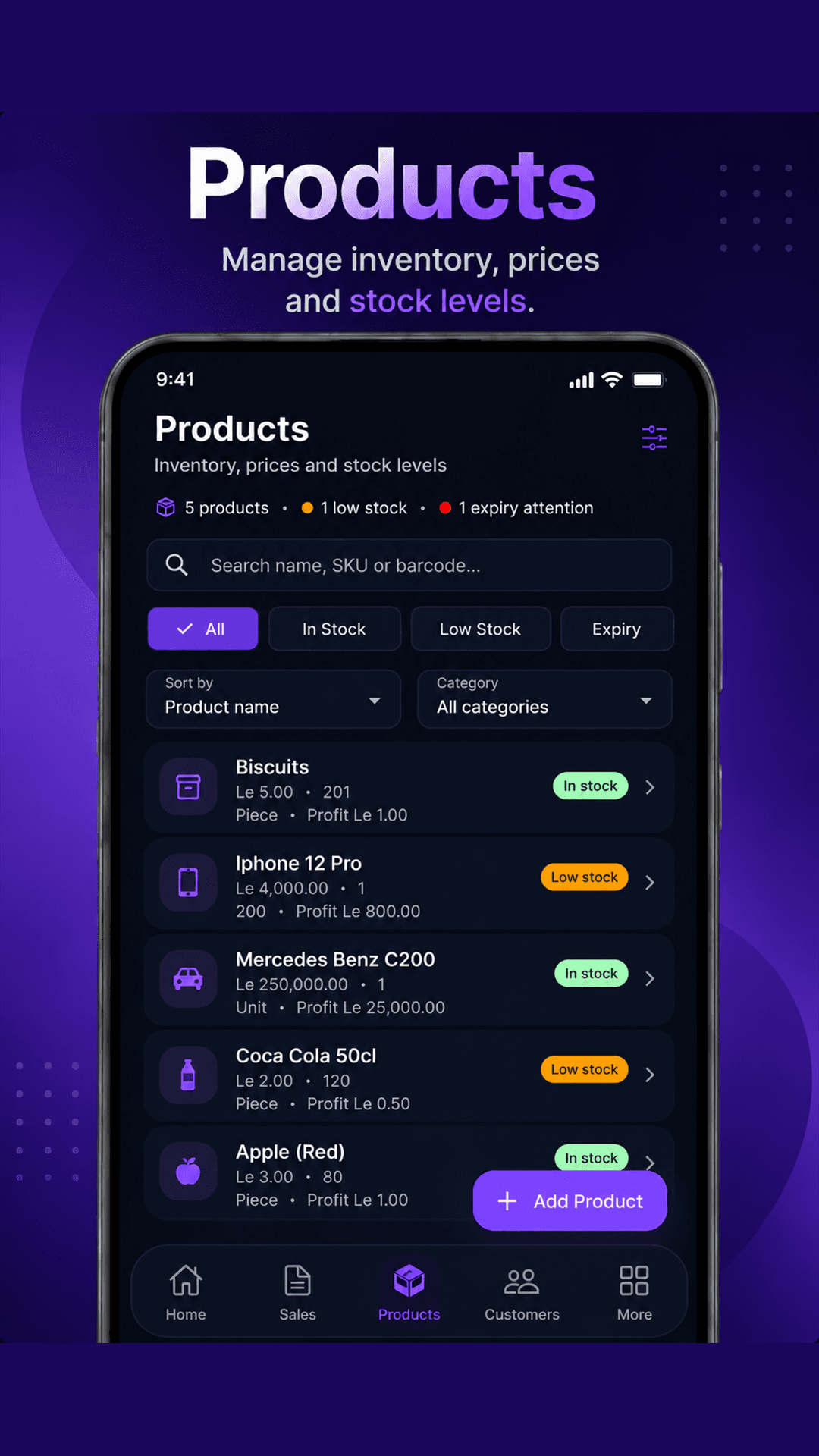
    Search inventory, watch low-stock or expiry states, track customer purchases and balances, and follow up when it matters.

  4. 04

    Ask, dictate, or create with Sabi

    Use Sabi to ask about the business, dictate a prompt, or start creating a sale without breaking your operating flow.

  5. 05

    Review the signal and act

    Use sales, expense, payment, and business activity views to turn scattered transactions into a clearer next decision.

A workflow you can see

Each important question has a place to start

SabiBom turns the most common business questions into focused views and actions.

01 · See the business clearly

A smart dashboard for the decisions that matter today

Start with a focused view of sales, orders, alerts, and business activity instead of piecing the story together from notebooks and scattered messages.

Read the full feature breakdown

SabiBom smart dashboard showing sales, orders, alerts, and the main business navigation.

02 · Stay ahead of stock

Products, prices, profit, and stock in one working view

SabiBom helps owners keep an eye on what is available, what is running low, and which products need expiry attention while they manage their catalog.

Read the full feature breakdown
SabiBom products screen showing inventory search, stock filters, prices, quantities, and profit values.

03 · Know your customers

Keep customer history and balances close to every sale

Build a practical customer record with contact details, purchase history, and balances so follow-up is easier and relationships do not live only in memory.

Read the full feature breakdown
SabiBom customer management screen showing customer search, balance filters, purchase counts, and messaging.

Ready when you are

Start with one clearer day.

Join the beta and help shape the tools that make everyday business operations easier to understand.

Join Beta Testing